A short URL is easy to share, but the real value starts after someone clicks. If you know how to track clicks on a short URL, you can see which campaigns get attention, which channels bring useful visitors, and which links are not worth promoting anymore.
The mistake many teams make is treating click count as the whole story. A link with 5,000 clicks may look successful, but those clicks may come from bots, the wrong country, repeat visitors, or people who leave immediately. Good click tracking helps you look past the big number and understand what is really happening.
Start With the Question You Want the Link to Answer
Before creating a short URL, decide what you want to learn from it. A short link for an Instagram bio should answer a different question than a short link on a QR code, email campaign, influencer post, or paid ad.
For example, an Instagram bio link might answer, “Are profile visitors clicking through to our offer?” A QR code might answer, “Did people at this event scan the poster?” An influencer link might answer, “Did this creator send real traffic or just views?”
When the goal is clear, the tracking setup becomes easier. You know what to name the link, where to place it, and which numbers matter.
How to Track Clicks on a Short URL
To track clicks on a short URL, create the link with a URL shortener that includes analytics. After the link is shared, the tool records click activity and shows you data such as total clicks, unique clicks, device type, country, referrer, and time of click.
The basic process is simple. Add your destination URL, create a short link, share it in your campaign, then review the click analytics. If you are running multiple campaigns, create separate tracked short URLs for each one.
This matters because one shared link across every platform creates unclear data. If Instagram, TikTok, email, and QR codes all use the same short URL, you may know the total clicks, but you will not know which channel caused them.
Total Clicks Are Useful, But Not Enough
Total clicks are the easiest number to understand. They show how many times the short URL was clicked. But total clicks can be misleading if you look at them alone.
A link may get many clicks because one person opened it repeatedly. It may get traffic from bots or preview crawlers. It may spike because a social app scanned the link before showing a preview. It may also get low-quality clicks from the wrong audience.
That does not mean click count is useless. It is a starting point. But you should compare it with unique clicks, referrers, devices, locations, and conversion behavior before deciding whether the campaign worked.
Track Each Channel Separately
If you want useful data, avoid using one short URL everywhere. Create different links for different channels, even if they all point to the same destination.
For example, create one short link for Instagram bio, one for TikTok profile, one for newsletter, one for QR posters, and one for each creator campaign. This gives you cleaner reporting.
A practical naming structure might look like this: campaign name, channel, placement, and date. You do not need a complicated system. You just need enough detail so you can understand the report later without guessing.
What Short URL Analytics Can Tell You
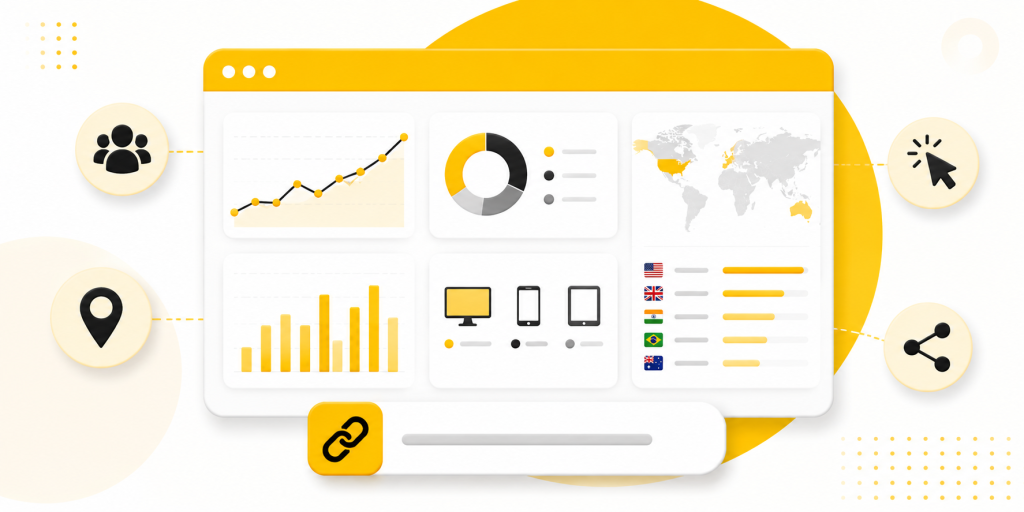
Good short URL tracking can reveal patterns that are easy to miss.
You may learn that:
- Instagram gets more clicks, but email brings more serious visitors
- QR codes perform well at events but poorly on printed flyers
- Android users click more than iPhone users for a certain campaign
- Most clicks happen within the first 24 hours after posting
- A creator sends traffic, but most visitors never reach the final offer
- One country is driving clicks even though the campaign targets another market
These insights help you adjust campaigns while they are still active, not after the budget is gone.
Use UTM Parameters for Deeper Tracking
Short URL analytics tells you what happened at the link level. UTM parameters help your website analytics understand where visitors came from after they arrive.
For example, you can add UTM tags for source, medium, campaign, and content. A short URL can hide the long UTM link, so users see a clean URL while your analytics still receives campaign data.
This is useful when you want to connect short link clicks with website behavior. You can compare clicks from the short URL tool with sessions, signups, purchases, app downloads, or form submissions inside your analytics platform.
Watch for Click Data That Looks Too Perfect
Not every click is a real person with real intent. Some clicks come from bots, security scanners, messaging app previews, social media crawlers, or internal team testing.
A sudden burst of clicks from one location, clicks with no follow-up behavior, or unusually high activity right after sending an email may need a closer look. The same applies when click numbers in your short URL tool do not match website analytics.
The goal is not to remove every strange click. That is rarely possible. The goal is to avoid making big decisions from one surface-level number.
Short Links Work Better When the Destination Matches the Click
Tracking is only useful if the destination makes sense. If someone clicks a short URL from an Instagram Story about a discount, they should not land on a generic homepage. If they scan a QR code at an event, they should not have to search for the page mentioned on the poster.
A good short URL connects the promise of the campaign to the right destination. That could be a product page, app download page, booking form, link in bio page, event page, or limited-time offer.
This also makes your analytics easier to read. If the link and destination are aligned, weak performance is easier to diagnose.
A Simple Click Tracking Setup for Real Campaigns
For a real campaign, start with one clear destination and create separate short URLs by placement. Add UTMs when the traffic goes to your website. Use clear names so you can compare results later.
For example, if you are launching a mobile app, you might create separate short links for Instagram bio, TikTok bio, creator posts, email newsletter, and QR posters. Each link can send users to the same download page, but the analytics will show which placement created the most interest.
With itlink.to, you can create trackable short links for campaigns and keep your URLs clean while still understanding how people click. This is useful when you want one simple link for users but better reporting for your marketing team.
Turn Short URL Clicks Into Better Decisions

When you track clicks on a short URL properly, you stop guessing. You can see which channels deserve more attention, which campaigns need better messaging, and which links are getting clicks without real follow-through.
The key is to create links with a purpose. Separate your channels, use UTMs when needed, check more than total clicks, and compare link data with real business outcomes.
Start with one campaign. Create a clean short URL, track the clicks, review the data, and improve the next campaign based on what people actually did.
References
- Google Analytics — Campaign URL Builder Official production utility used to systematically append specific tracking syntax (UTM tags) to web addresses for channel isolation.
- Google Analytics Help — URL Builders and Campaign Tracking Foundational tracking documentation explaining how custom parameter metadata is processed, attributed, and stored within destination reporting properties.
- Meta Business Help Center — Link Clicks and Landing Page Views Operational support guide examining conversion tracking variance, specifically differentiating preliminary user interactions from verified asset loads.
- Apple Developer — App Store Connect Analytics Overview Platform resource outlining attribution metrics, detailing how external campaigns, referrer networks, and app store impressions translate into client conversions.
- Google Play Console — App Statistics and Performance Reports System documentation covering core metrics dashboards, including audience acquisition, dynamic funnel analysis, and storefront source identification.