Firebase Dynamic Links alternatives are now important for any team that used Firebase links for app downloads, QR codes, referral links, social media campaigns, or mobile app routing. The shutdown created a practical problem: old link journeys need to be replaced, but not every team needs the same type of solution.
Some teams need deep links that open a specific screen inside an app. Some need a simple app download link that sends iPhone users to the App Store and Android users to Google Play. Others need attribution, install tracking, paid campaign reporting, and advanced mobile measurement.
This guide compares the best Firebase Dynamic Links alternatives in 2026 based on real use cases, so you can choose the right replacement without overpaying for features you do not need.
Firebase Dynamic Links Shut Down. What Should You Replace First?
The first mistake many teams make is looking for a tool before understanding what their Firebase Dynamic Links were actually doing. That creates confusion because Firebase Dynamic Links was used for several different jobs. A single team might have used it for app downloads, invite links, QR codes, referral campaigns, email buttons, social media links, and deep links into specific app screens.
Before choosing a Firebase Dynamic Links replacement, start with your most visible and highest-risk links. These are usually the links placed in ads, QR codes, app landing pages, onboarding emails, influencer posts, and social media bios. If those links send users to the wrong destination, the impact is immediate. App downloads drop, users get confused, and campaign performance becomes harder to measure.
For example, a QR code on a poster should not send every user to a generic homepage. An iPhone user should go to the Apple App Store, an Android user should go to Google Play, and a desktop user should probably see a landing page with app information. That is a routing problem, not necessarily an enterprise deep linking problem.
So the first thing to replace is not always the most advanced feature. Replace the link journeys that directly affect user acquisition, app installs, and active campaigns. Once those are safe, you can plan deeper product-level linking and attribution later.
What Your Firebase Links Were Actually Doing
Not every Firebase Dynamic Link had the same purpose. Some links were simple app download links. Some were used for app-to-app sharing. Some opened a specific product, profile, booking, event, or invitation screen inside the app. Others were used mainly because they looked cleaner than long App Store and Google Play URLs.
This matters because different replacements solve different problems. Native App Links and Universal Links are useful when you want installed users to open the app from a web URL. Smart routing tools are useful when you want one link to send different users to different destinations based on device. Enterprise platforms are useful when you need deferred deep linking, install attribution, paid media reporting, and advanced growth analytics.
A good audit should answer three questions for every important link. Where is the link used? What should happen on iPhone, Android, and desktop? Does the link need to open the app, send users to an app store, track campaign performance, or remember a destination after installation?
Once you answer those questions, the replacement choice becomes much clearer. You stop asking, “What is the best Firebase Dynamic Links alternative?” and start asking, “Which tool solves this specific link journey?”
Best Firebase Dynamic Links Alternatives in 2026
The best Firebase Dynamic Links alternatives in 2026 are not all direct copies of Firebase Dynamic Links. They are different types of tools that solve different parts of the same problem.
- itlink.to One Route: Best for simple app store routing where iPhone users go to the App Store, Android users go to Google Play, and desktop users go to a website or landing page.
- Branch: Best for advanced deep linking, deferred deep linking, enterprise growth journeys, and complex app referral flows.
- AppsFlyer OneLink: Best for teams already using AppsFlyer for mobile attribution and paid user acquisition.
- Adjust: Best for mobile measurement, attribution, and performance marketing teams that need campaign-level reporting.
- Native App Links and Universal Links: Best for product teams that want app-owned deep links using their own domain.
- Bitly: Best for branded short links and basic campaign link management.
- Dub: Best for modern marketing links, short URLs, and link analytics.
The right choice depends on what you lost when Firebase Dynamic Links shut down. If you lost a simple app download link, you probably do not need an enterprise attribution platform. If you lost deferred deep linking for referral flows, a basic short link tool will not be enough. If you lost branded short links with basic click analytics, you may not need mobile SDKs at all.
itlink.to One Route: Best for App Store and Google Play Routing
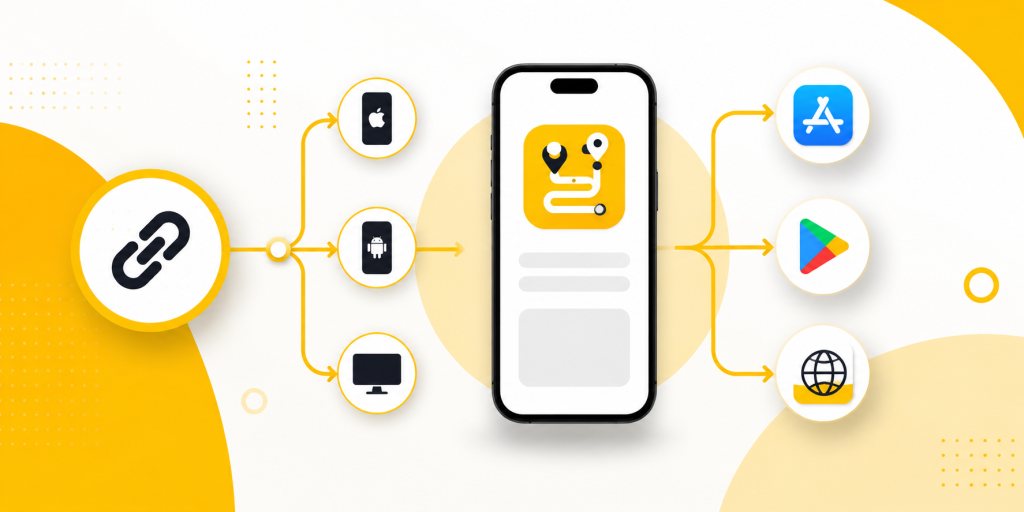
itlink.to One Route is a strong fit when your main need is simple, reliable device-based routing. This is one of the most common Firebase Dynamic Links replacement use cases. You want one clean link that works everywhere, but the destination should change depending on the user’s device.
For example, a mobile app campaign might use one link in a TikTok bio, Instagram profile, printed QR code, email footer, or paid ad. When someone clicks from an iPhone, they should go to the Apple App Store. When someone clicks from Android, they should go to Google Play. When someone clicks from desktop, they should go to your app landing page. That is exactly the kind of journey smart routing is designed to solve.
This is useful because many app download campaigns receive mixed traffic. A social media post does not know whether the next visitor is on iOS, Android, or desktop. A QR code on a restaurant table, event booth, flyer, receipt, or packaging also needs to work for everyone. Asking users to choose their platform manually adds friction and can reduce conversions.
One Route is not trying to replace every advanced deep linking platform. Its value is that it solves a clear marketing problem without unnecessary complexity. If your team mainly needs one link for App Store, Google Play, and desktop routing, a smart routing tool can be faster and easier than implementing a full enterprise mobile attribution stack.
Branch: Best for Advanced Deep Linking and App Growth
Branch is one of the strongest options for teams that need advanced deep linking and app growth infrastructure. It is better suited for companies with complex user journeys, referral programs, content sharing flows, and post-install destinations. If your Firebase Dynamic Links were used to open specific in-app pages and continue the user journey after installation, Branch may be worth considering.
For example, a marketplace app might need a link that opens a specific product page. A travel app might need to open a hotel, itinerary, or destination guide. A social app might need invite links that bring new users into a specific profile, group, or conversation. These use cases are more complex than simple app store routing because the link needs to preserve context.
The tradeoff is complexity. Branch can be powerful, but it may require SDK integration, developer setup, testing, attribution configuration, and ongoing management. For a team that only needs a clean app download link, that may be more than necessary.
Branch is best when deep linking is part of the product experience, not just a marketing link. If users frequently share app content, invite friends, or need to land on specific screens after installing the app, Branch becomes more relevant.
AppsFlyer OneLink and Adjust: Best for Attribution and Paid Acquisition Teams
AppsFlyer OneLink and Adjust are best for teams where the link is connected to mobile attribution, paid acquisition, and performance marketing. These platforms are usually not chosen only because a team needs a short link. They are chosen because the business needs to understand which campaigns, ad networks, channels, and sources are driving installs and user actions.
This matters for companies spending serious money on mobile ads. If your team runs paid campaigns across Meta, Google, TikTok, influencer channels, and partner networks, you may need more than device routing. You may need install attribution, campaign reporting, fraud controls, SKAdNetwork support, and post-install event measurement.
In that situation, the replacement question changes. You are not only replacing Firebase Dynamic Links. You are choosing part of your mobile growth analytics stack. AppsFlyer and Adjust are stronger fits when marketing performance data is just as important as the link destination.
However, if you are not running complex paid acquisition, these tools may be too heavy. A startup launching its first app campaign may not need a full attribution platform just to send users to the correct app store. For simple app download journeys, a lightweight smart routing link may be easier to set up and maintain.
Native App Links and Universal Links: Best for Product-Owned Deep Links
Native App Links and Universal Links are important because they give your own domain the ability to open your app. Android App Links and iOS Universal Links are platform-level methods for connecting web URLs to app destinations. When configured properly, they allow supported links to open inside the app instead of staying in the browser.
This is a good long-term foundation. It gives your product and engineering team more control because the link relationship is tied to your own domain and app configuration. It is especially useful for account verification links, shared content links, invite flows, product pages, booking pages, or any screen that should open directly in the installed app.
The limitation is that native app links are not a full marketing link management system by themselves. They do not automatically give you a dashboard for short links, QR codes, campaign analytics, device routing, or easy destination changes. They also require careful technical setup. Your domain association files, app configuration, URL paths, and fallback behavior all need to be tested on real devices.
For many teams, native App Links and Universal Links should be part of the replacement plan, but not the whole plan. They are excellent for product-owned deep links. For public marketing links, app download campaigns, and QR codes, you may still want a smart routing layer on top.
Bitly and Dub: Best for Link Management and Short URLs
Bitly and Dub are useful when your Firebase Dynamic Links use case was closer to link management than deep linking. If your team mainly wanted clean links, branded URLs, custom aliases, and click analytics, these tools may be enough for some campaigns.
For example, a marketing team might need a short link for an email campaign, a LinkedIn post, a website button, or a downloadable PDF. In these cases, the most important features may be link branding, easy editing, analytics, and team management. Bitly is well known in this category, while Dub is popular with modern teams that want a simple link management experience.
The key limitation is that short link tools are not automatically full Firebase Dynamic Links replacements. A short URL is not the same as app routing, deferred deep linking, or mobile attribution. If your link needs to decide between App Store, Google Play, and desktop destinations, make sure the tool supports that routing logic. If your link needs to open an exact in-app screen after installation, make sure your app and link setup support that journey.
Bitly and Dub are best when your problem is managing links, not rebuilding mobile deep linking infrastructure. They can be part of your link stack, but they should not be chosen blindly just because they create short URLs.
How to Choose the Right Firebase Dynamic Links Alternative

Choosing the right replacement becomes easier when you match the tool to the use case. Do not start with the biggest platform. Start with the link behavior your users actually need.
- If you need iPhone users to go to the App Store, Android users to go to Google Play, and desktop users to go to a landing page, choose a smart routing solution.
- If you need installed users to open a specific app screen, implement Native App Links and Universal Links.
- If you need deferred deep linking, referral flows, and complex post-install journeys, consider Branch.
- If you need attribution, paid campaign reporting, and mobile measurement, consider AppsFlyer OneLink or Adjust.
- If you need branded short URLs and basic analytics, consider Bitly or Dub.
- If you need QR codes for app downloads, make sure the destination works correctly across iPhone, Android, and desktop.
- If you need a fast Firebase Dynamic Links replacement for marketing campaigns, avoid overbuilding before you know your real requirements.
The best choice is often a combination. Your app may use Universal Links for product-owned deep links, a smart routing tool for app download campaigns, and a separate analytics platform for paid acquisition. That is normal. Firebase Dynamic Links combined multiple jobs into one product, but your replacement does not always need to be one tool.
The best Firebase Dynamic Links alternatives are the ones that match the link journey you need to replace. If your biggest problem is app store routing, use a smart routing solution. If your biggest problem is deep linking into app screens, use Native App Links, Universal Links, or a dedicated deep linking platform. If your biggest problem is attribution, look at mobile measurement tools like AppsFlyer or Adjust.
For many teams, the practical answer is not to buy the most powerful platform immediately. The practical answer is to protect the links that affect users and campaigns first. Start with app download links, QR codes, social media bios, landing page buttons, referral links, and paid campaign URLs. Then decide which parts need smart routing, which parts need deep linking, and which parts need analytics.
Firebase Dynamic Links alternatives are not all the same. A simple app download campaign, an enterprise referral system, and a paid attribution setup require different solutions. Once you understand that, migration becomes much easier. You can choose the right tool for the right job and keep users moving to the correct destination without unnecessary complexity.
References
- Firebase Dynamic Links Deprecation FAQ, Firebase by Google Official Firebase FAQ confirming the Firebase Dynamic Links shutdown date and migration context.
- Android App Links Documentation, Android Developers Explains how Android App Links work and how verified web links can open app content directly.
- Supporting Associated Domains, Apple Developer Apple’s official documentation for Universal Links and associated domains on iOS.
- AppsFlyer OneLink Documentation, AppsFlyer Explains how OneLink supports deep linking, redirection, and campaign-based user journeys.