A TikTok link not opening the correct app store is more than a small technical issue. It can break the exact moment when someone is ready to install your app. The user taps from TikTok, expects the right download page, and lands somewhere confusing instead. Maybe an iPhone user sees a Google Play page. Maybe an Android user opens an App Store preview. Maybe TikTok opens a web browser that never reaches the store at all.
That broken click journey is expensive because TikTok traffic moves fast. People do not want to troubleshoot links. They do not want to search for your app manually. They do not want to choose between store buttons unless they have to. If the link sends them to the wrong place, many users simply leave.
For app founders, growth teams, and mobile marketers, the fix is not just “change the link.” The real fix is to build a download path that understands where the user is coming from, what device they are using, and which destination makes sense. TikTok campaigns need links that can handle iPhone, Android, desktop, in-app browsers, and fallback pages without making the user think.
The click is working, but the download journey is broken
Many TikTok app campaigns look healthy at the surface. The video gets views. The call to action is clear. The link receives clicks. But installs stay low. When this happens, teams often blame the creative, audience, or offer first. Sometimes those are the problem. But often, the download journey is broken after the click.
A TikTok click is only the first step. The user still needs to reach the correct store page, recognize the app, and install it. If the link opens the wrong destination, every step after that becomes harder. A campaign can generate real interest and still lose users because the route from TikTok to the app store is not built properly.
This is why app download links need to be tested as full journeys, not just as URLs. A link can technically open and still fail the user. If the user lands on the wrong store, a generic homepage, a blank in-app browser, or a page with too many choices, the campaign is leaking installs.
TikTok’s in-app browser can change how your link behaves
TikTok often opens links inside its own in-app browser before sending users anywhere else. That browser does not always behave the same way as Safari, Chrome, or a normal device browser. This is one reason a link can work during internal testing but fail when real users tap it from TikTok.
For example, a redirect may open smoothly in Safari but pause inside TikTok. An app store link may display as a browser preview instead of jumping directly to the store. A deep link may not trigger the expected app behavior. A tracking URL may pass through too many redirects and create friction.
This matters because marketers often test links the wrong way. They paste the link into a desktop browser, see that it opens, and assume the campaign is ready. But TikTok users are not clicking from that environment. They are clicking from inside TikTok, usually on mobile, often with a short attention span.
The safest test is simple: open the TikTok app on a real iPhone, tap the live link, and follow the journey. Then do the same on a real Android device. The link is only ready when both users reach the correct destination without confusion.
One raw App Store link is not enough for a mixed-device audience
A common mistake is placing one raw App Store link in a TikTok bio, ad, caption flow, or creator campaign. That may work for iPhone users, but it does not serve Android users well. The opposite is also true. A Google Play link may work for Android users, but it creates a poor journey for iPhone users.
TikTok audiences are mixed. Even if your app is popular on one platform, your viewers may still include iOS users, Android users, desktop users, tablet users, and people opening shared links from other apps. One fixed store URL cannot serve all of them properly.
This is the core reason TikTok app links often feel broken. The campaign is asking one link to do a job that requires routing. The link needs to understand the user’s device before choosing the destination.
For a mobile app campaign, the public link should be simple. The routing behind it should be smart. iPhone users should go to the App Store. Android users should go to Google Play. Desktop users should see a useful page that helps them continue on mobile.
The wrong store page creates silent install loss
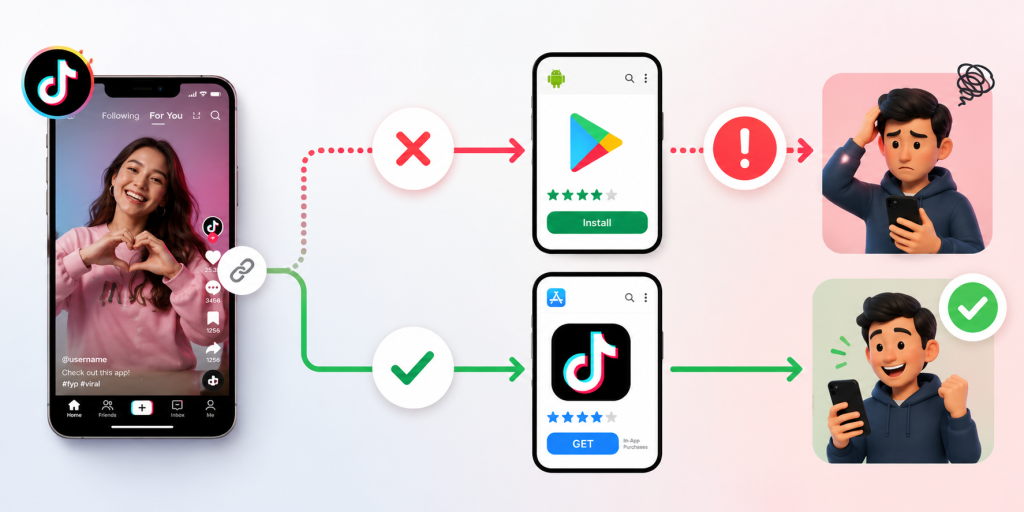
The worst part about a wrong app store redirect is that many users will not tell you. A few may comment that the link is broken. Some may send a message. Most will simply leave. That makes the problem quiet but costly.
This silent loss can make campaign reporting misleading. TikTok clicks may look strong, but app installs remain weak. The team may assume the video attracted low-quality users. In reality, the link may have sent qualified users to the wrong destination.
Wrong store pages also create trust issues. If a user taps to download your app and lands somewhere that does not match their device, the experience feels unprofessional. It suggests that the campaign was not prepared properly. For new apps, this can hurt confidence before the user even sees the product.
A good app download path should remove doubt. The user should not need to understand the difference between platforms, redirects, browser behavior, or store URLs. They should tap once and see the right next step.
How to check whether TikTok is the problem or your link is
Before rewriting your TikTok content, isolate the issue. The problem may be TikTok’s in-app browser, your redirect setup, your app store URL, your tracking parameters, or your fallback page.
Start by testing the same link in three places: inside TikTok, inside a normal mobile browser, and inside a messaging app. If it works in Safari or Chrome but fails inside TikTok, the in-app browser may be part of the issue. If it fails everywhere, the link or redirect setup is likely wrong.
Then test by device. Use a real iPhone and a real Android phone. Do not rely only on desktop previews or screenshots from one team member. A link can behave correctly on iOS and fail on Android, or the other way around.
Finally, check the destination itself. Make sure the App Store and Google Play URLs are current. Confirm that the app is available in the countries you are targeting. If the app is not available everywhere, your fallback page should explain what users can do next.
Testing should answer one question clearly: when a TikTok user taps, do they reach the most useful destination for their device?
A smarter TikTok app link should decide the destination for the user
The best app download links do not make the user choose too early. They route users automatically when possible and provide a clear fallback when not possible. This is where smart links are useful for TikTok campaigns.
A smart app link can send iPhone users to the App Store, Android users to Google Play, and desktop users to a landing page with QR codes or store buttons. The public link stays simple, while the routing logic handles the messy part behind the scenes.
This is especially useful for TikTok because the same video can reach many user types. Someone may tap from an iPhone. Someone else may share the video to a friend on Android. Another person may open the link from desktop later. A raw store URL cannot handle all of these paths elegantly.
A smart link also makes campaign management easier. Instead of changing every TikTok placement when a destination changes, you can update the final route behind the link. That matters for app launches, beta campaigns, creator promotions, and paid ads.
Your fallback page should not look like a homepage
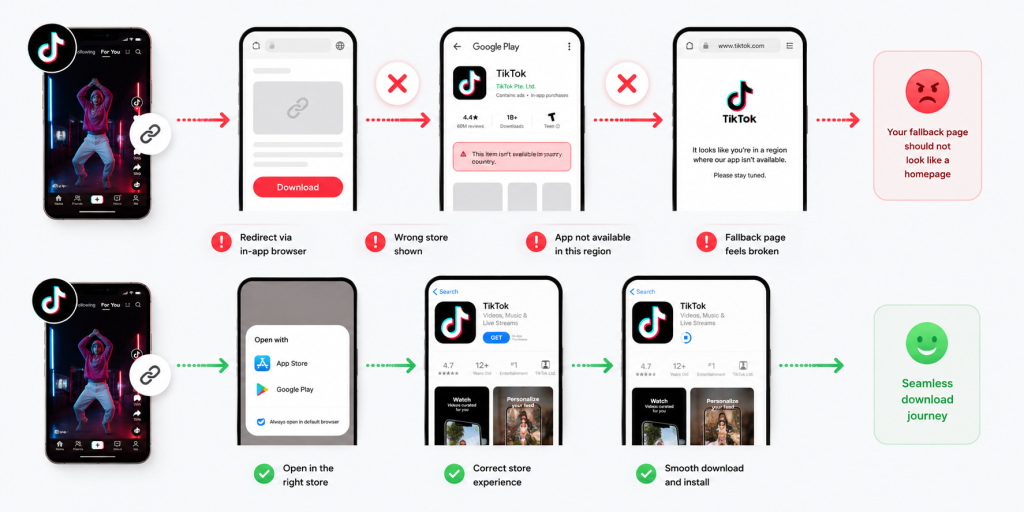
When direct routing does not work, users need a fallback page. But that page should not be your generic homepage. A TikTok user who taps an app download link has a specific intent. They want the app. The fallback page should help them complete that action quickly.
A strong fallback page should include App Store and Google Play buttons near the top. It should explain the app in one or two short lines. If the user is on desktop, it should include a QR code to continue on mobile. If the app is not available in a user’s country, the page should say so clearly and offer a waitlist or update option.
The page should also avoid distractions. Do not send users into a long marketing site when they are already trying to install. The more steps you add, the more installs you lose.
Think of the fallback page as a rescue path. It exists for moments when TikTok, the browser, the device, or the store redirect does not behave perfectly. Its job is to keep the user moving.
Creator campaigns need controlled links, not copied store URLs
If you work with TikTok creators, do not let every creator copy and paste their own app store link. This creates inconsistent user journeys and messy reporting. One creator may use the App Store URL. Another may use Google Play. Another may use your homepage. Another may paste an old campaign link.
Give each creator a controlled smart link instead. That link should route users correctly and track performance separately. This lets you compare which creator drove clicks, which content style worked, and whether TikTok interest turned into app installs.
This also protects the user experience. Every creator can promote the same simple action, while the link handles device routing behind the scenes. The creator does not need to explain different download paths for iPhone and Android users.
For paid creator campaigns, this is especially important. If the link is wrong, you may pay for attention that never becomes installs. A controlled link makes the campaign easier to measure and easier to fix.
Fix the path before you spend more on TikTok traffic
A TikTok app campaign should be checked in this order: content, click, route, store page, install. Many teams skip the route and jump straight from content to install numbers. That is a mistake.
If the route is broken, spending more money will only send more users into the same problem. Before increasing ad budget, boosting creator posts, or publishing more videos, make sure the download path works from TikTok on real devices.
For teams that need one link to route TikTok users to the correct app store, itlink.to can be used as a practical smart link option for app campaigns, store redirects, and mobile-first tracking: https://itlink.to/#hub-link
The goal is simple. A user who taps from TikTok should not have to think about which store to open. The link should take them there.
TikTok link not opening the correct app store conclusion
A TikTok link not opening the correct app store usually means the campaign has a routing problem. The content may be fine. The audience may be interested. The click may already be happening. But the user is being sent to the wrong destination after that click.
The fix is to treat your app download link as part of the campaign, not as an afterthought. Test it inside TikTok. Test it on iPhone and Android. Check the fallback page. Make sure the store destination matches the user’s device. Give creators controlled links. Avoid raw single-store URLs when your audience is mixed.
TikTok can create fast mobile attention, but attention only matters if the next step works. A better app link turns that tap into a smoother path toward install.
References
- Apple Developer — Allowing Apps and Websites to Link to Your Content Core architectural guide outlining the implementation of Universal Links to securely route web traffic directly to native iOS application layers.
- Android Developers — App Links Implementation Guide Google’s core platform documentation explaining how to build, verify, and handle Android App Links to ensure reliable, non-ambiguous web-to-app deep linking behavior.
- Google Analytics — Campaign URL Builder Official production utility designed to systematically append custom UTM parameters to destination paths to isolate specific marketing attribution traffic.
ใส่ความเห็น