ป้ายกำกับ: mobile app marketing

  • Smart Links vs Deep Links: Which One Do You Actually Need?

    Smart Links vs Deep Links: Which One Do You Actually Need?

    Smart links vs deep links is one of the most common questions in app marketing because both technologies influence what happens after a user clicks a link. However, they solve different problems.

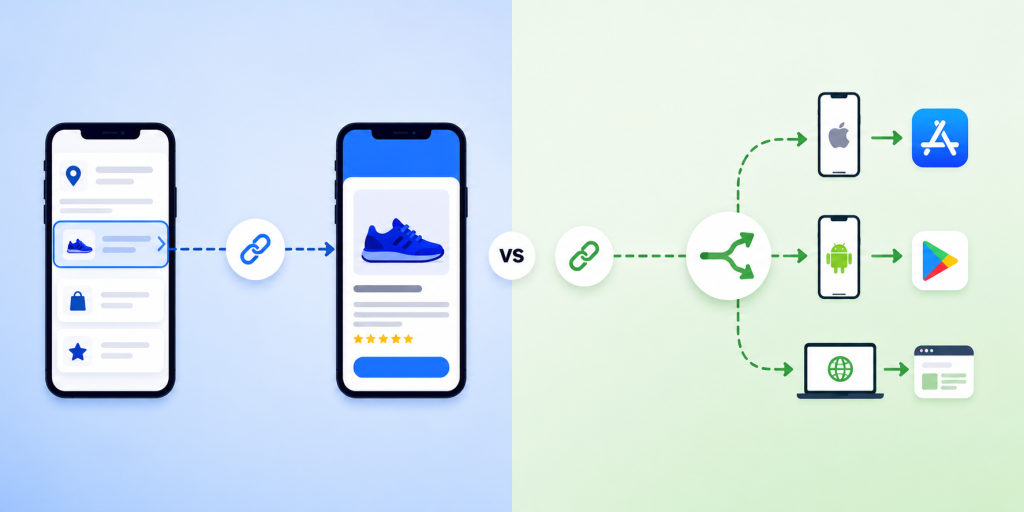
    A smart link decides where a user should go. A deep link decides what a user should see.

    For example, a smart link may detect whether someone is using an iPhone, Android device, or desktop browser and send them to the correct destination automatically. A deep link may open a specific hotel listing, product page, booking screen, or user profile inside an app.

    Many teams assume they need deep links when they actually need smart links. Others build smart routing but never create deep links, forcing users to navigate through multiple screens after opening the app. Understanding the difference can improve app downloads, campaign performance, user experience, and conversion rates.

    Smart Links vs Deep Links: Quick Answer

    The easiest way to understand smart links vs deep links is to look at their primary purpose.

    FeatureSmart LinksDeep Links
    Route users by deviceYesNo
    Route users by countryYesNo
    Send users to App StoreYesNo
    Send users to Google PlayYesNo
    Open a specific app screenNoYes
    Useful for app downloadsExcellentLimited
    Useful for user retentionGoodExcellent
    Useful for QR code campaignsExcellentLimited
    Works across web and mobileYesDepends on implementation

    If your main goal is helping users reach the correct destination, smart links are usually the better choice.

    If your main goal is helping users reach specific content inside an app, deep links are usually the better choice.

    How Smart Links Work

    A smart link acts like a decision engine between the click and the destination.

    Instead of sending every visitor to the same URL, a smart link evaluates information such as device type, operating system, browser, location, language, or campaign source. Based on those signals, it sends the user to the most relevant destination.

    For example:

    • iPhone users go to the App Store
    • Android users go to Google Play
    • Desktop users go to a web landing page
    • Users from different countries see localized content
    • Existing customers go to one destination while new users go to another

    This is why smart links are widely used in app marketing, QR code campaigns, social media bios, email campaigns, influencer marketing, and offline advertising.

    Instead of creating multiple URLs, marketers can use one link that automatically handles routing.

    How Deep Links Work

    Deep links are designed to open a specific location inside an app.

    Rather than opening the app homepage, a deep link can open:

    • A product page
    • A booking confirmation
    • A travel itinerary
    • A specific hotel listing
    • A payment request
    • A user profile
    • A promotional offer

    For example, if a travel app sends an email promoting discounted flights to Tokyo, a deep link can open the Tokyo flight results screen directly inside the app.

    Without deep linking, users might land on the app home screen and search for the offer manually.

    This additional step often reduces conversion rates and increases abandonment.

    Universal Links, App Links, and Deferred Deep Linking

    One reason smart links vs deep links becomes confusing is because other technologies are involved.

    Apple Universal Links and Android App Links are technologies that allow web URLs to open apps directly when the app is installed.

    Deferred deep linking extends the experience further. If the app is not installed, the user first visits the App Store or Google Play. After installation, the user is taken to the intended content instead of the app homepage.

    For example:

    A user clicks a hotel promotion.

    Without deferred deep linking:

    1. User goes to App Store
    2. User installs app
    3. User opens homepage
    4. User searches again

    With deferred deep linking:

    1. User goes to App Store
    2. User installs app
    3. Hotel promotion opens automatically

    This creates a much smoother onboarding experience.

    When Smart Links Are Better

    Smart links are usually the best choice when your audience is unknown.

    Examples include:

    • Instagram bio links
    • TikTok profile links
    • QR codes
    • Podcast promotions
    • Creator campaigns
    • Offline advertising
    • Email newsletters
    • App install campaigns

    In these situations, you do not know which device or operating system the user is using.

    A smart link removes that uncertainty and routes users automatically.

    For many companies, improving routing creates a bigger performance improvement than implementing deep links.

    When Deep Links Are Better

    Deep links become more valuable after users already have the app installed.

    Common examples include:

    • Push notifications
    • Referral invitations
    • Account verification
    • Product recommendations
    • Cart recovery emails
    • Loyalty rewards
    • Booking reminders
    • Shared content

    In each case, the goal is not choosing the destination platform. The goal is opening the correct screen immediately.

    This reduces friction and helps users complete the intended action faster.

    Why Most Apps Need Both

    The highest-performing mobile apps rarely choose between smart links and deep links.

    They combine both.

    A smart link handles routing outside the app.

    A deep link handles navigation inside the app.

    Imagine a hotel booking campaign.

    A new user clicks the campaign:

    • Smart link sends them to the correct app store.
    • Deferred deep link opens the hotel offer after installation.

    An existing user clicks the same campaign:

    • Smart link detects the app environment.
    • Deep link opens the hotel offer immediately.

    The user experiences one seamless journey even though multiple technologies are working behind the scenes.

    Common Mistakes That Hurt Campaign Performance

    Several mistakes appear repeatedly in app marketing campaigns.

    • Sending all users to the homepage instead of relevant content
    • Using separate links for iOS and Android
    • Ignoring desktop visitors
    • Creating QR codes with non-editable destinations
    • Building deep links without app-install fallbacks
    • Using multiple link tools that fragment analytics

    These issues create unnecessary friction and make campaign performance harder to measure.

    A cleaner link structure often improves results before any additional advertising budget is spent.

    Which One Should You Use?

    The answer depends on the stage of the user journey.

    Choose smart links when:

    • Your goal is app downloads
    • Users may come from different devices
    • You need QR code campaigns
    • You want one shareable campaign URL
    • You need routing flexibility

    Choose deep links when:

    • Users already have the app
    • You want to open specific screens
    • You are focused on retention
    • You send push notifications
    • You share content inside the app

    For most businesses, smart links solve more immediate problems because acquisition campaigns usually involve multiple devices and destinations.

    Once acquisition is working smoothly, deep links help optimize the experience after users enter the app.

    Final Verdict: Smart Links vs Deep Links

    Smart links vs deep links is not really a choice between two competing technologies.

    They solve different parts of the same user journey.

    Smart links determine where users should go based on device, platform, and context. Deep links determine what users should see once they arrive.

    If your primary goal is app downloads, QR code campaigns, social media marketing, or app store routing, start with smart links.

    If your primary goal is improving user engagement, retention, and in-app navigation, implement deep links.

    Most successful apps eventually use both.

    If you need a practical way to manage smart links, app routing, short links, QR codes, and campaign analytics from one place, itlink.to provides a simpler starting point without requiring a complex deep-linking setup from day one.

    References

  • Best Smart Link Tools for Mobile Apps in 2026

    Best Smart Link Tools for Mobile Apps in 2026

    When mobile app teams search for smart link tools, they often discover dozens of products that appear to do the same thing. Some focus on app downloads. Some focus on attribution. Some focus on deep linking. Others focus on social media traffic. The challenge is not finding a smart link tool. The challenge is choosing the right type of smart link for the stage your app is currently in.

    A startup trying to get its first thousand installs has very different needs from a mature app running global acquisition campaigns. Understanding these differences can save time, money, and engineering effort.

    Most App Teams Are Solving Different Problems

    The phrase “smart link” means different things depending on who you ask. A growth marketer may think about campaign tracking. A mobile developer may think about deep linking. A product manager may think about onboarding flows. In practice, smart links usually fall into three categories: app routing links, deep links, and attribution links.

    The mistake many teams make is choosing an enterprise solution before they have clearly identified which problem needs solving.

    Smart App Routing Is the Most Common Use Case

    For most mobile apps, the biggest challenge is getting users to the correct app store. Someone clicks a link from Instagram, TikTok, YouTube, a QR code, or an email campaign. The user should arrive at the App Store if they are on iPhone and Google Play if they are on Android.

    This sounds simple, but many teams still share separate store links or send visitors to a generic landing page. Smart app routing removes that friction and creates a cleaner download experience.

    Different Types of Smart Link Tools

    Not every smart link platform serves the same purpose.

    Smart Link TypePrimary GoalBest For
    App RoutingApp downloadsAcquisition campaigns
    Deep LinkingIn-app navigationExisting users
    Attribution LinksMarketing measurementGrowth teams
    Link-in-Bio LinksSocial trafficCreators and brands
    QR Smart LinksOffline campaignsEvents and print marketing

    Understanding these categories makes it easier to choose a platform that fits your goals instead of paying for features you may never use.

    Why App Download Campaigns Need Smart Routing

    Many app campaigns fail because users encounter unnecessary decisions. A social media visitor clicks a link and sees separate App Store and Google Play buttons. Some users choose the wrong option. Others abandon the process entirely.

    Smart routing eliminates this step. The link automatically detects the user’s device and sends them to the correct destination. This creates a smoother experience and helps marketers maintain a single link across all campaigns.

    Smart Links Become More Valuable as Channels Grow

    The more marketing channels you use, the more valuable smart links become. A startup may begin with one Instagram profile, but later add TikTok, YouTube, newsletters, influencers, QR codes, and paid advertising. Managing separate store URLs across all these channels quickly becomes difficult.

    A smart link creates consistency. Every campaign can use a clean destination while still allowing marketers to track traffic separately when needed.

    Deep Linking and Smart Routing Are Not the Same Thing

    Many marketers use the terms interchangeably, but they solve different problems. Smart routing focuses on helping users reach the correct store or destination. Deep linking focuses on taking users to a specific screen inside the app.

    For example, a food delivery app may use smart routing to acquire new users and deep links to send existing users directly to a restaurant page. Most apps need both eventually, but acquisition usually comes first.

    What Startups Should Look For

    Most startups do not need enterprise-level attribution platforms on day one. Instead, they should focus on simplicity, reliability, and ease of implementation.

    Useful features include:

    • One link for both app stores
    • Device detection
    • Campaign tracking
    • QR code compatibility
    • Fast setup
    • No SDK requirement
    • Simple analytics

    A smart link should reduce complexity, not introduce more of it.

    Where OneRoute Fits

    OneRoute from itlink.to focuses on one of the most common mobile app marketing problems: app downloads. Instead of sharing separate App Store and Google Play URLs, marketers can create one smart link that automatically routes users based on device.

    This approach works well for social media bios, influencer campaigns, newsletters, paid ads, QR codes, and app launch promotions. Because marketers only need one link, campaigns become easier to manage while creating a cleaner experience for users.

    When HubLink Makes More Sense

    Sometimes visitors need more than an app download button. A startup may want to share its app, waitlist, pricing page, help center, investor deck, and social profiles from one destination. In these situations, a link-in-bio style solution is often more appropriate.

    HubLink from itlink.to allows brands to create a single page that organizes multiple destinations. Many app companies use HubLink as their social profile destination while using OneRoute as the primary app download CTA inside that page.

    Choosing the Best Smart Link Tool for Mobile Apps

    The best smart link tools for mobile apps are not necessarily the most advanced. They are the tools that solve your current growth problem with the least amount of friction.

    If your goal is increasing app installs, smart routing should be the priority. If your goal is improving in-app experiences, deep linking becomes more important. If your goal is measuring complex acquisition funnels, attribution tools may be worth exploring.

    For many mobile apps in 2026, a combination of smart app routing and simple campaign tracking delivers the highest value. With free tools like OneRoute and HubLink from itlink.to, teams can improve app acquisition without investing in unnecessary complexity before they need it.

    References

  • TikTok Link Not Opening the Correct App Store: What to Do

    TikTok Link Not Opening the Correct App Store: What to Do

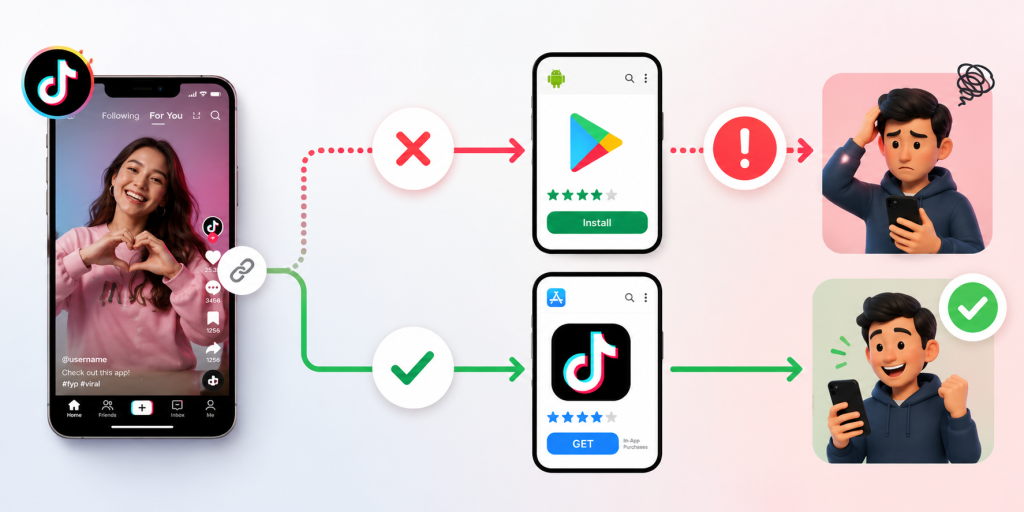
    A TikTok link not opening the correct app store is more than a small technical issue. It can break the exact moment when someone is ready to install your app. The user taps from TikTok, expects the right download page, and lands somewhere confusing instead. Maybe an iPhone user sees a Google Play page. Maybe an Android user opens an App Store preview. Maybe TikTok opens a web browser that never reaches the store at all.

    That broken click journey is expensive because TikTok traffic moves fast. People do not want to troubleshoot links. They do not want to search for your app manually. They do not want to choose between store buttons unless they have to. If the link sends them to the wrong place, many users simply leave.

    For app founders, growth teams, and mobile marketers, the fix is not just “change the link.” The real fix is to build a download path that understands where the user is coming from, what device they are using, and which destination makes sense. TikTok campaigns need links that can handle iPhone, Android, desktop, in-app browsers, and fallback pages without making the user think.

    The click is working, but the download journey is broken

    Many TikTok app campaigns look healthy at the surface. The video gets views. The call to action is clear. The link receives clicks. But installs stay low. When this happens, teams often blame the creative, audience, or offer first. Sometimes those are the problem. But often, the download journey is broken after the click.

    A TikTok click is only the first step. The user still needs to reach the correct store page, recognize the app, and install it. If the link opens the wrong destination, every step after that becomes harder. A campaign can generate real interest and still lose users because the route from TikTok to the app store is not built properly.

    This is why app download links need to be tested as full journeys, not just as URLs. A link can technically open and still fail the user. If the user lands on the wrong store, a generic homepage, a blank in-app browser, or a page with too many choices, the campaign is leaking installs.

    TikTok’s in-app browser can change how your link behaves

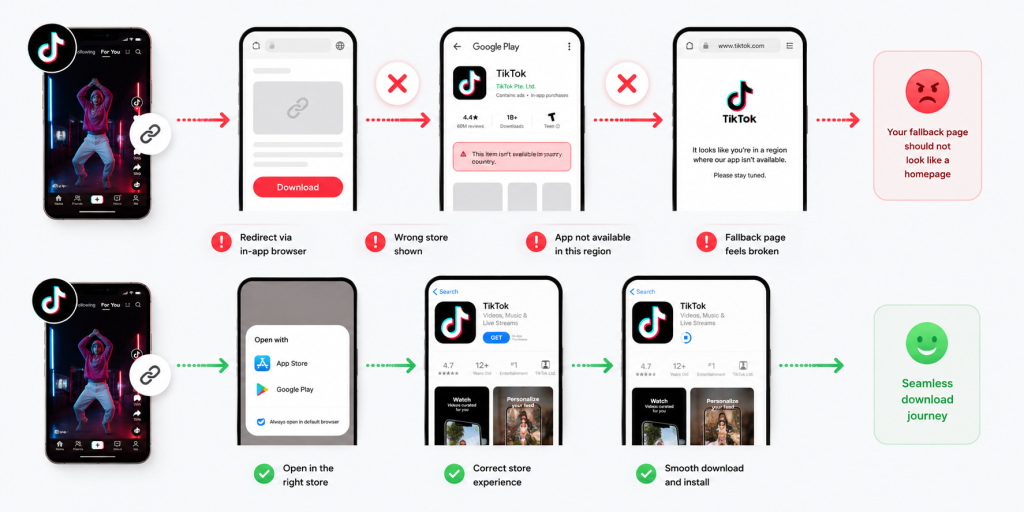
    TikTok often opens links inside its own in-app browser before sending users anywhere else. That browser does not always behave the same way as Safari, Chrome, or a normal device browser. This is one reason a link can work during internal testing but fail when real users tap it from TikTok.

    For example, a redirect may open smoothly in Safari but pause inside TikTok. An app store link may display as a browser preview instead of jumping directly to the store. A deep link may not trigger the expected app behavior. A tracking URL may pass through too many redirects and create friction.

    This matters because marketers often test links the wrong way. They paste the link into a desktop browser, see that it opens, and assume the campaign is ready. But TikTok users are not clicking from that environment. They are clicking from inside TikTok, usually on mobile, often with a short attention span.

    The safest test is simple: open the TikTok app on a real iPhone, tap the live link, and follow the journey. Then do the same on a real Android device. The link is only ready when both users reach the correct destination without confusion.

    One raw App Store link is not enough for a mixed-device audience

    A common mistake is placing one raw App Store link in a TikTok bio, ad, caption flow, or creator campaign. That may work for iPhone users, but it does not serve Android users well. The opposite is also true. A Google Play link may work for Android users, but it creates a poor journey for iPhone users.

    TikTok audiences are mixed. Even if your app is popular on one platform, your viewers may still include iOS users, Android users, desktop users, tablet users, and people opening shared links from other apps. One fixed store URL cannot serve all of them properly.

    This is the core reason TikTok app links often feel broken. The campaign is asking one link to do a job that requires routing. The link needs to understand the user’s device before choosing the destination.

    For a mobile app campaign, the public link should be simple. The routing behind it should be smart. iPhone users should go to the App Store. Android users should go to Google Play. Desktop users should see a useful page that helps them continue on mobile.

    The wrong store page creates silent install loss

    The worst part about a wrong app store redirect is that many users will not tell you. A few may comment that the link is broken. Some may send a message. Most will simply leave. That makes the problem quiet but costly.

    This silent loss can make campaign reporting misleading. TikTok clicks may look strong, but app installs remain weak. The team may assume the video attracted low-quality users. In reality, the link may have sent qualified users to the wrong destination.

    Wrong store pages also create trust issues. If a user taps to download your app and lands somewhere that does not match their device, the experience feels unprofessional. It suggests that the campaign was not prepared properly. For new apps, this can hurt confidence before the user even sees the product.

    A good app download path should remove doubt. The user should not need to understand the difference between platforms, redirects, browser behavior, or store URLs. They should tap once and see the right next step.

    How to check whether TikTok is the problem or your link is

    Before rewriting your TikTok content, isolate the issue. The problem may be TikTok’s in-app browser, your redirect setup, your app store URL, your tracking parameters, or your fallback page.

    Start by testing the same link in three places: inside TikTok, inside a normal mobile browser, and inside a messaging app. If it works in Safari or Chrome but fails inside TikTok, the in-app browser may be part of the issue. If it fails everywhere, the link or redirect setup is likely wrong.

    Then test by device. Use a real iPhone and a real Android phone. Do not rely only on desktop previews or screenshots from one team member. A link can behave correctly on iOS and fail on Android, or the other way around.

    Finally, check the destination itself. Make sure the App Store and Google Play URLs are current. Confirm that the app is available in the countries you are targeting. If the app is not available everywhere, your fallback page should explain what users can do next.

    Testing should answer one question clearly: when a TikTok user taps, do they reach the most useful destination for their device?

    A smarter TikTok app link should decide the destination for the user

    The best app download links do not make the user choose too early. They route users automatically when possible and provide a clear fallback when not possible. This is where smart links are useful for TikTok campaigns.

    A smart app link can send iPhone users to the App Store, Android users to Google Play, and desktop users to a landing page with QR codes or store buttons. The public link stays simple, while the routing logic handles the messy part behind the scenes.

    This is especially useful for TikTok because the same video can reach many user types. Someone may tap from an iPhone. Someone else may share the video to a friend on Android. Another person may open the link from desktop later. A raw store URL cannot handle all of these paths elegantly.

    A smart link also makes campaign management easier. Instead of changing every TikTok placement when a destination changes, you can update the final route behind the link. That matters for app launches, beta campaigns, creator promotions, and paid ads.

    Your fallback page should not look like a homepage

    When direct routing does not work, users need a fallback page. But that page should not be your generic homepage. A TikTok user who taps an app download link has a specific intent. They want the app. The fallback page should help them complete that action quickly.

    A strong fallback page should include App Store and Google Play buttons near the top. It should explain the app in one or two short lines. If the user is on desktop, it should include a QR code to continue on mobile. If the app is not available in a user’s country, the page should say so clearly and offer a waitlist or update option.

    The page should also avoid distractions. Do not send users into a long marketing site when they are already trying to install. The more steps you add, the more installs you lose.

    Think of the fallback page as a rescue path. It exists for moments when TikTok, the browser, the device, or the store redirect does not behave perfectly. Its job is to keep the user moving.

    Creator campaigns need controlled links, not copied store URLs

    If you work with TikTok creators, do not let every creator copy and paste their own app store link. This creates inconsistent user journeys and messy reporting. One creator may use the App Store URL. Another may use Google Play. Another may use your homepage. Another may paste an old campaign link.

    Give each creator a controlled smart link instead. That link should route users correctly and track performance separately. This lets you compare which creator drove clicks, which content style worked, and whether TikTok interest turned into app installs.

    This also protects the user experience. Every creator can promote the same simple action, while the link handles device routing behind the scenes. The creator does not need to explain different download paths for iPhone and Android users.

    For paid creator campaigns, this is especially important. If the link is wrong, you may pay for attention that never becomes installs. A controlled link makes the campaign easier to measure and easier to fix.

    Fix the path before you spend more on TikTok traffic

    A TikTok app campaign should be checked in this order: content, click, route, store page, install. Many teams skip the route and jump straight from content to install numbers. That is a mistake.

    If the route is broken, spending more money will only send more users into the same problem. Before increasing ad budget, boosting creator posts, or publishing more videos, make sure the download path works from TikTok on real devices.

    For teams that need one link to route TikTok users to the correct app store, itlink.to can be used as a practical smart link option for app campaigns, store redirects, and mobile-first tracking: https://itlink.to/#hub-link

    The goal is simple. A user who taps from TikTok should not have to think about which store to open. The link should take them there.

    TikTok link not opening the correct app store conclusion

    A TikTok link not opening the correct app store usually means the campaign has a routing problem. The content may be fine. The audience may be interested. The click may already be happening. But the user is being sent to the wrong destination after that click.

    The fix is to treat your app download link as part of the campaign, not as an afterthought. Test it inside TikTok. Test it on iPhone and Android. Check the fallback page. Make sure the store destination matches the user’s device. Give creators controlled links. Avoid raw single-store URLs when your audience is mixed.

    TikTok can create fast mobile attention, but attention only matters if the next step works. A better app link turns that tap into a smoother path toward install.

    References

  • Best Branch.io Alternative for Startups (No Enterprise Pricing)

    Best Branch.io Alternative for Startups (No Enterprise Pricing)

    Finding the right branch.io alternative is not always about replacing every advanced feature Branch.io offers. For many startups, the real problem is much simpler: you need one link that works correctly when someone clicks from an iPhone, Android device, desktop browser, social media app, email campaign, or QR code.

    Imagine you are launching a new mobile app. You add your App Store link to Instagram, but Android users cannot download the app from that link. Then you add a Google Play link too, but now your profile looks messy. You print a QR code for an event, but you are not sure whether it should point to the App Store, Google Play, or your website. This is the moment many teams start searching for Branch.io, deep links, smart links, and app routing tools.

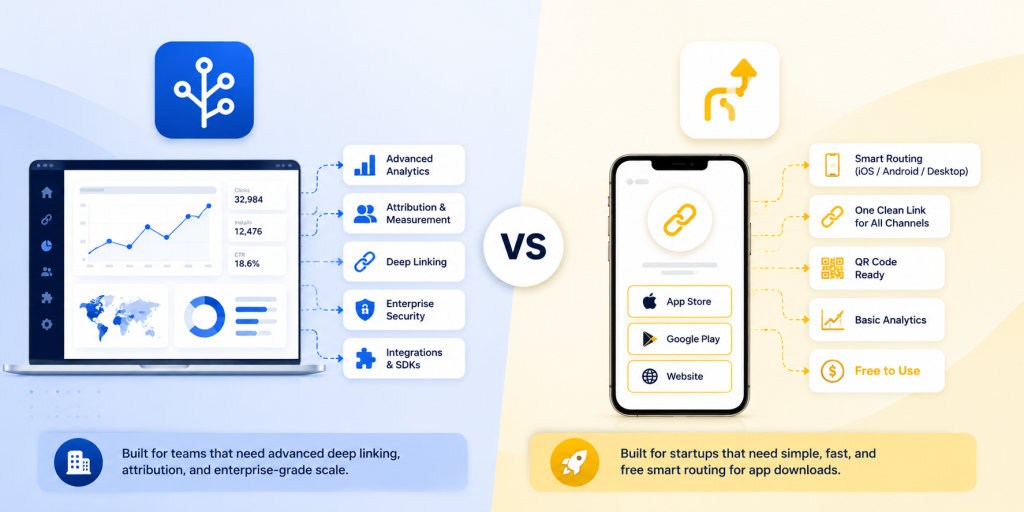
    Branch.io is powerful, especially for larger companies that need deep linking, attribution, and enterprise-level mobile growth infrastructure. But if your startup mainly needs clean app download routing, you may not need a full enterprise platform yet. You may need a simpler, free tool that helps you send the right user to the right destination.

    Why Startups Search for a Branch.io Alternative

    Startups usually search for a Branch.io alternative when their marketing becomes more serious than a single app store link. At first, a founder may simply share the App Store URL with friends, early users, or beta testers. That works until the audience becomes mixed.

    A creator campaign may send traffic from both iPhone and Android users. A paid ad may be opened inside Instagram, TikTok, or a mobile browser. A QR code at a booth may be scanned by hundreds of people using different devices. A desktop visitor may click the same link from an email newsletter and expect to see a proper landing page instead of a mobile-only app store screen.

    The problem is not just link shortening. The problem is routing. A normal short link can make a long URL cleaner, but it does not automatically know whether the visitor should go to the App Store, Google Play, or a desktop page. That is why startups begin looking for smart routing tools.

    The best solution depends on the stage of the business. A funded growth team running advanced attribution may need an enterprise platform. A small startup trying to launch faster may need something simpler, easier, and more affordable.

    The Real Question: Do You Need Deep Linking or Smart Routing?

    Many startups use the word “deep linking” when they actually mean “send users to the correct download page.” These are related, but they are not the same problem.

    Deep linking is useful when the user already has your app installed and you want to open a specific place inside the app. For example, a travel app might open a hotel detail page, a fitness app might open a workout program, or a shopping app might open a product page.

    Smart routing is different. It is mainly about deciding where a visitor should go based on their device. If the visitor is on iPhone, send them to the Apple App Store. If they are on Android, send them to Google Play. If they are on desktop, send them to your website or landing page.

    For many startups, smart routing is the first real need. They are not yet trying to build complex in-app journeys. They are trying to stop wasting clicks. If someone is ready to download your app, the link should not send them to the wrong store.

    Choosing a full enterprise deep linking platform before you need it can slow down the team. It can create extra setup, extra technical decisions, and extra cost before the campaign has even proven itself.

    When Branch.io Makes Sense

    Branch.io can make sense for companies that need more than simple app download routing. If your team is running large paid acquisition campaigns, managing complex attribution, working across multiple product flows, or sending users into specific in-app screens, Branch.io may be a strong option.

    It is especially relevant when mobile attribution is a major part of your growth operation. Larger teams may need advanced analytics, integrations, campaign measurement, deferred deep linking, and more technical control over user journeys.

    That level of functionality is valuable, but it is not always necessary for a startup’s first app launch campaign. A small team may not have a dedicated growth engineer. The marketing owner may simply need to create one clean link for Instagram, QR codes, influencer campaigns, and ads.

    This is where the decision becomes practical. The question is not “Is Branch.io good?” The better question is “Do we need this level of platform right now?”

    If the answer is no, a lighter smart routing tool may be a better fit.

    Where Startups Often Overpay or Overcomplicate

    A common mistake is buying or implementing a tool based on what the company might need later, instead of what the campaign needs now. This can happen when a startup reads about deep linking, attribution, and mobile growth stacks, then assumes it must set everything up before launch.

    In reality, many early campaigns need only a few things: one clean link, correct device routing, a desktop fallback, basic analytics, and the ability to update destinations. That is enough for many app launch campaigns, event campaigns, creator promotions, and QR code tests.

    Overcomplication creates hidden costs. The team spends more time understanding settings. Developers may need to support setup. Marketers wait for implementation. Campaigns get delayed. In the worst case, the startup pays for a sophisticated system while still using only the most basic feature: sending people to the correct app store.

    A simple setup is not a weakness. For an early-stage team, speed is often more valuable than complexity. If you can launch a campaign today, test it, and see which channels bring clicks, that is already useful progress.

    What a Startup-Friendly Branch.io Alternative Should Include

    A good Branch.io alternative for startups should focus on the job your team is trying to complete. If the main job is app download routing, the tool should make that easy without forcing you into unnecessary enterprise workflows.

    Look for these essentials:

    • Device-based routing for iPhone, Android, and desktop visitors.
    • One clean short link for campaigns, bios, QR codes, and ads.
    • App Store, Google Play, and desktop fallback destinations.
    • Easy editing so you can update destinations without changing the shared link.
    • Basic analytics for clicks, devices, browsers, and locations.
    • QR code support for offline and event marketing.
    • Simple setup that a founder, marketer, or product manager can understand.
    • Free or startup-friendly pricing so you can test before committing budget.

    The most important point is usability. If the tool is technically impressive but your team avoids using it, it will not help your campaign. A good startup tool should make the next step obvious.

    Branch.io vs One Route by itlink.to: A Practical Comparison

    Branch.io and One Route are not trying to solve the exact same level of problem. Branch.io is a broader mobile linking and attribution platform. One Route is focused on smart routing for app download and campaign links.

    For a large company, Branch.io may be the stronger choice if the team needs deep linking into app screens, advanced attribution, enterprise integrations, and detailed mobile growth infrastructure.

    For a startup, One Route may be the better choice if the immediate goal is simpler: create one link that sends iPhone users to the App Store, Android users to Google Play, and desktop users to a website or landing page.

    This distinction matters because many startups do not need every advanced feature on day one. They need a link that works, is easy to share, and does not confuse users.

    For example, if you are running a launch campaign with a small budget, you may only need to know whether people clicked, what device they used, and whether your link experience worked correctly. You do not necessarily need a full attribution system before your first real growth test.

    That is why itlink.to’s One Route can be a practical option. It gives startups a free way to create smart routing links without jumping straight into enterprise pricing or complex setup.

    Real Campaign Examples Where Smart Routing Wins

    Smart routing becomes most useful when one link needs to work across many environments. A startup rarely controls where people will open a link. The same campaign URL might appear in a social bio, a QR code, a newsletter, a pitch deck, a blog article, and a paid ad.

    Useful examples include:

    • An app launch page where the main CTA should work for both iPhone and Android users.
    • An Instagram bio link where there is only room for one clean download link.
    • A QR code on posters, flyers, event booths, receipts, packaging, or table cards.
    • An influencer campaign where each creator needs one simple trackable link.
    • A paid ad campaign where users may open the link inside mobile app browsers.
    • A newsletter where desktop users should see a landing page instead of a mobile store.
    • A product demo or pitch deck where investors, partners, and users may click from different devices.

    In each case, the user should not have to think. They should click once and land in the right place. That is the whole value of smart routing.

    Common Mistakes to Avoid Before Launching Your App Link

    The first mistake is using only the App Store link everywhere. This immediately creates a bad experience for Android users. The second mistake is adding both App Store and Google Play links everywhere, which makes campaigns look cluttered and forces users to choose manually.

    Another mistake is forgetting the desktop fallback. Not every click comes from a phone. If someone opens your app link from a laptop, they should land on a clear page that explains the app and gives them a way to continue.

    Startups should also test links inside social media apps. Instagram, TikTok, Facebook, LinkedIn, and X may open links inside in-app browsers. A link that works perfectly in Safari or Chrome should still be tested in the places where users will actually click.

    Finally, do not print QR codes until you have tested the routing. A broken printed QR code is painful because you cannot edit the paper after it is distributed. Use a smart link behind the QR code so the destination can be updated later if needed.

    One Route is a good fit if your startup needs smart app routing, not a full enterprise deep linking platform. It helps you use one clean link to send iPhone users to the App Store, Android users to Google Play, and desktop visitors to your website or landing page.

    This makes it useful for app launches, QR code campaigns, influencer promotions, paid ads, social media bios, and email marketing. The biggest advantage is that itlink.to is free, so you can test app download routing before committing to a larger platform.

    Branch.io may still be better for advanced deep linking, enterprise attribution, and complex mobile growth workflows. But if your main goal is simple app download routing, One Route is a faster and easier starting point.

    Create your first free smart routing link here: https://itlink.to/#one-route

    References

    • Apple Developer – Universal Links Official Apple documentation explaining how links can route users into apps and web destinations across Apple devices.
    • Android Developers – App Links Official Android documentation covering app links, deep linking behavior, and user routing on Android devices.
    • Branch – Deep Linking Explained A comprehensive guide breaking down the mechanics of mobile deep linking, deferred deep linking, and industry best practices.
    • itlink.to One Route A smart routing solution that detects device types to automatically redirect iPhone users to the App Store, Android users to Google Play, and desktop visitors to a custom landing page via a single link.